
Introducing Showcase: Share Your Book Collection Online
Your Trove has always been private — just for you. Starting today, you can turn it into a page anyone can visit: your own book collection, laid out like a shelf or a map, at a link you can drop in a text, a bio, or an email signature. We're calling it Showcase.
Why We Built This
Scanning a shelf and getting instant resale value is useful. But somewhere in building TroveScore, we kept noticing the same thing: people are genuinely proud of their book collections. A well-curated shelf says something about you — what you've read, what you collect, what you're into. That's worth more than a spreadsheet of titles and prices.
Showcase exists for that reason. It's a page you'd actually want to send to a friend — "here's what I've been reading" — not a settings export. If someone asks what's on your shelf, you don't have to describe it. You send a link.
There's a second reason, less about you and more about us: when your Showcase is out in the world, the people who see it discover TroveScore too. A friend clicks your link, sees their own shelf reflected in what's possible, and ends up scanning their own books. Every Showcase is also a small, honest invitation to try the app — which is exactly the kind of growth we'd rather have than ads.
Two Ways to Look at Your Collection
We built two views for launch, and we were deliberate about which two.
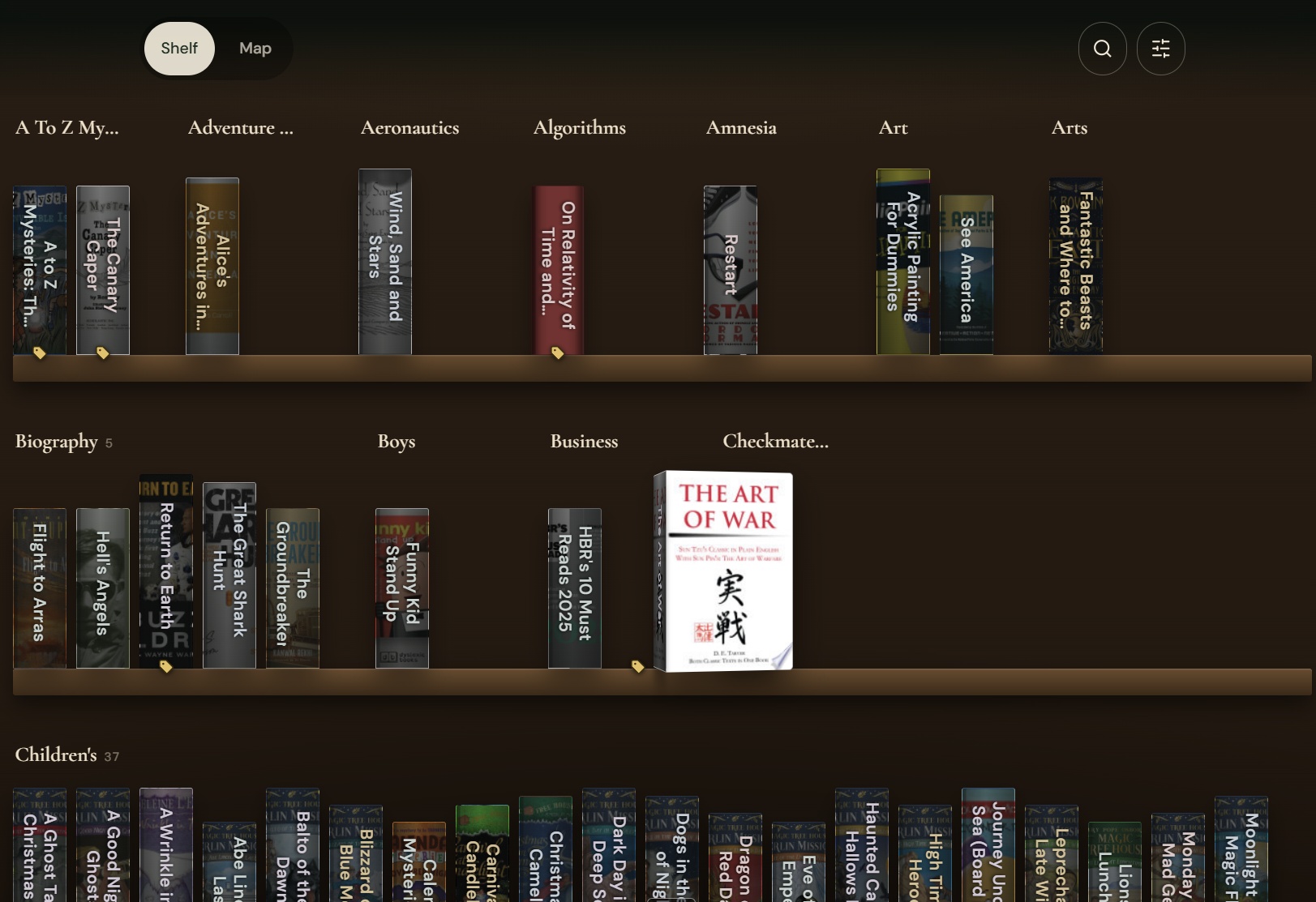
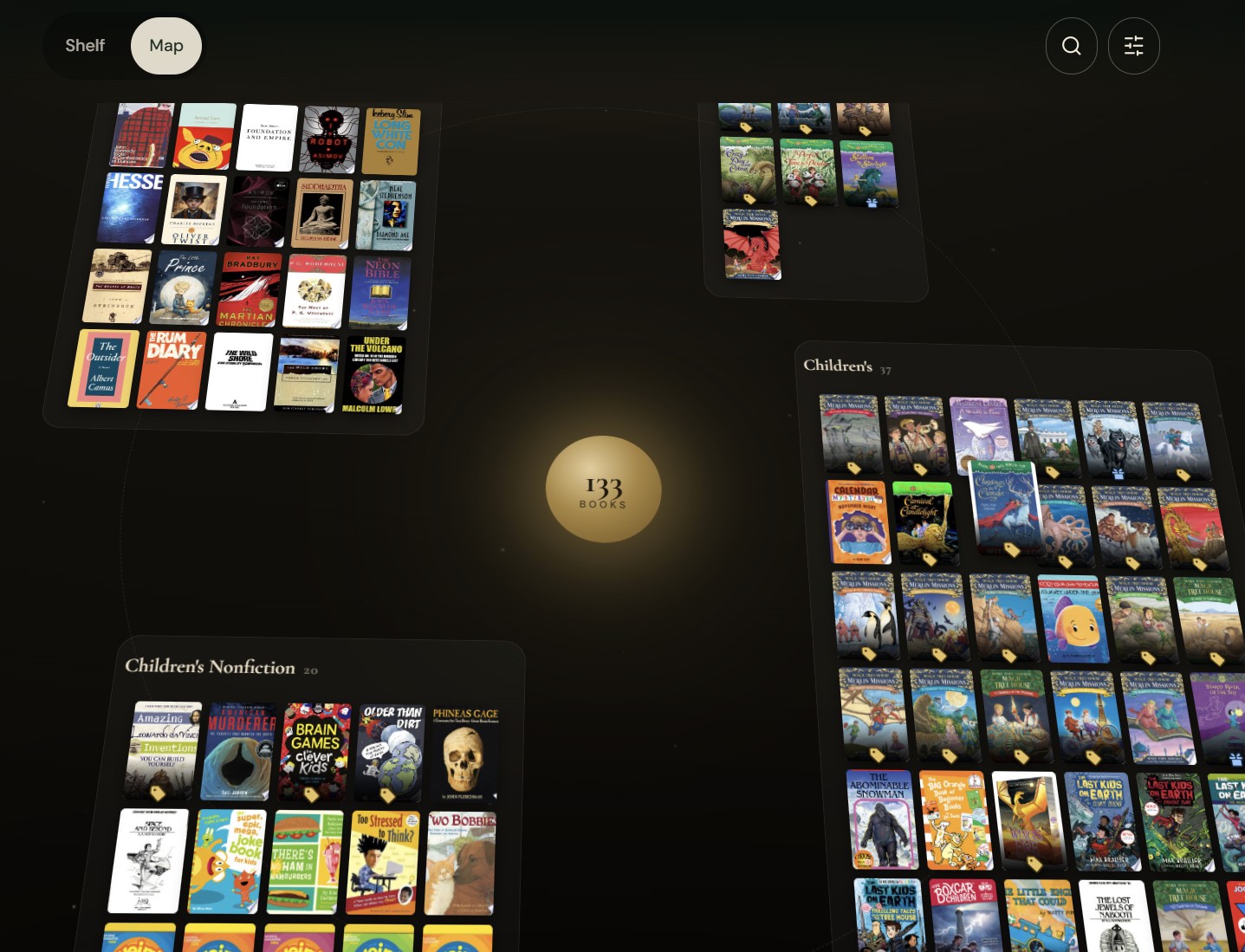
| View | What it feels like | Best for |
|---|---|---|
| Shelf | Real spines, standing upright, grouped row by row — like walking past a bookshelf | Browsing by series or category, at a glance |
| Map | A spatial canvas you pan and zoom, with each part of your collection living in its own "zone" | Exploring a large collection, wandering rather than scanning |
Shelf is the closest thing to how people actually experience a bookshelf in real life — spines lined up, organized, scannable in a few seconds. It's the view for someone who wants the fast answer: what's here, and how much of it.
Map is the opposite instinct. Instead of compressing your whole collection into a list, it gives it room — covers arranged in loose clusters you drag and zoom around, the way you might wander a used bookstore rather than search a catalog. It rewards spending a minute in it, which is exactly what we wanted for a collection someone's proud of.
Between the two, most collections have a natural home. A few hundred books organized tightly by series tends to read best on Shelf. A more eclectic, sprawling collection often feels more alive on Map. You can set either one as your default, and visitors can switch between them.
How to Set Up Your Showcase
- Sign in. Showcase needs an account — if you've been scanning books without signing in, sign in with Google first so your books and profile carry over.
- Open Settings, choose the Social tab and find the Showcase section. Flip the toggle to make your page public — every Showcase starts private until you turn it on.
- Pick your handle. Set the part of the URL that's yours —
trovescore.com/u/yourname— and optionally add a Showcase title, a short bio, and up to three social links. - Head to your Trove and open the Showcase tab. It sits alongside "My Trove" and "Scan History" — this is where you shape how the page looks.
- Choose your view and sort order. Pick Shelf or Map as your default, decide whether for-sale badges and prices show up, and sort by series, category, or a shuffled order.
- Copy your link and share it. Both Settings and the Showcase tab have a copy-link button — drop it wherever you'd share anything else.
Why Signed-In Only
Scanning itself has never required an account — that's intentional, and it's not changing. Showcase is different because it's not a one-time result, it's a persistent identity: a handle, a link, a page that has to keep working the next time someone visits it, from any device. That only makes sense tied to an account rather than to whichever phone happened to take the photo.
What We're Thinking About Next
Shelf and Map are the two views we felt good shipping first, but they're not the only ones we've sketched out. Along the way we prototyped a cozier "reading room" style layout, and we've got other ideas we haven't built yet — a timeline view, a wall-of-covers gallery, and a few others still in the notebook stage.
Rather than guess which one to build next, we'd rather hear it from people actually using Showcase. If there's a view you wish existed — reading room, gallery, something else entirely — tell us. The "helpful?" feedback link at the bottom of this post, and the feedback option inside the app, both reach us directly, and they genuinely shape what we build next.
Scanned your shelf already? Head to your Trove, open the Showcase tab, and turn your collection into a page worth sharing.
Set Up Your Showcase →Frequently Asked Questions
What is TroveScore Showcase?
Showcase is a public page — trovescore.com/u/yourname — that displays your scanned book collection to anyone with the link. You choose whether it's Shelf view (books arranged like spines on a shelf) or Map view (a spatial canvas you pan and zoom around), and you control what's visible.
Do I need an account to create a Showcase?
Yes. Scanning books with TroveScore doesn't require signing in, but Showcase does, since your public link and handle need to be tied to a persistent account rather than a single device.
Can visitors see what my books are worth?
Only if you turn that on. In the Showcase tab you can toggle whether estimated eBay value and for-sale badges appear on your public page, and adjust it any time.
Is my Showcase public by default?
No. Every Showcase starts private. You have to explicitly turn it on, either from the Showcase tab in your Trove or from Settings, before anyone with your link can see your collection.
Why is Showcase launching with only two views?
We wanted Shelf and Map to feel finished rather than shipping more half-built options. We're actively considering additional views, including a cozier reading-room style layout, and we're collecting feedback before deciding what to build next.